There’s a growing tension in the AI agent ecosystem that nobody wants to talk about: the very protocol designed to make agents more capable — MCP (Model Context Protocol) — might be making them dumber.
Over the past six months, our team has been building AI-assisted workflows for a large-scale enterprise platform — a distributed system with 11 microservices, 5 micro-frontends, a BFF layer, orchestration sagas, and a full CI/CD pipeline across multiple environments. The kind of project where you’d expect to wire up a dozen MCP servers and call it a day.
We didn’t. Instead, we built three custom Skills — plain Markdown files that teach the agent what to do — and paired them with CLI tools the agent already knows how to use. No MCP servers. No protocol overhead. No context pollution.
This article explains why we made that choice, what we built, and what the data says about it.
The Hidden Cost of MCP
MCP is an elegant idea: a standardized protocol that lets AI agents talk to external services. Install a server for GitHub, another for Slack, another for your CI/CD system, and your agent suddenly has superpowers.
The problem is where those superpowers live: in the context window.
Every MCP server injects its full tool schema — every endpoint, every parameter, every description — into the agent’s working memory at the start of every session. This happens before the agent reads your first message. Before it even knows what you need.
The numbers are sobering:
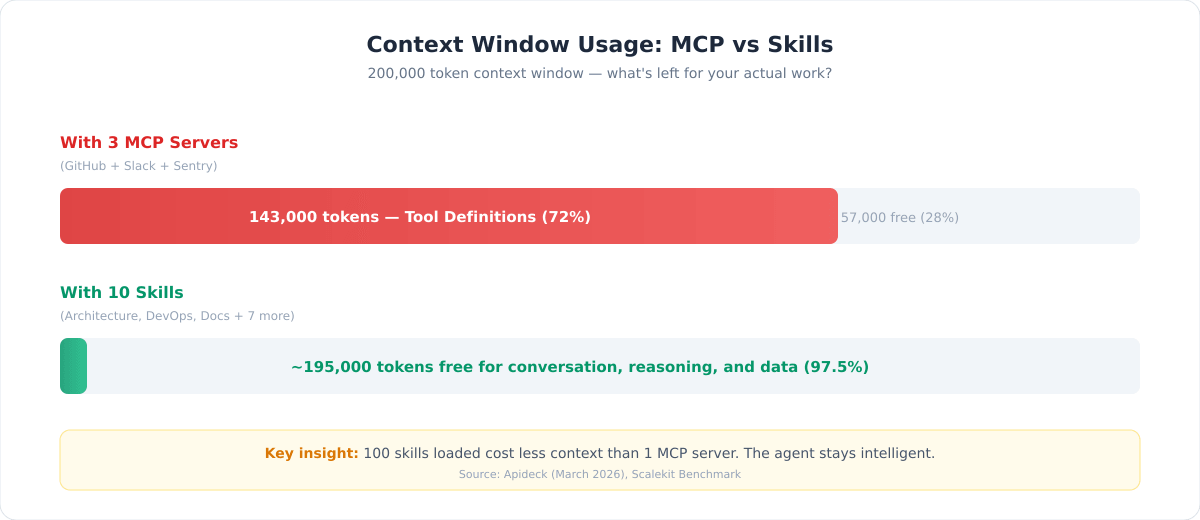
- Three MCP servers (GitHub, Slack, Sentry) can burn 55,000+ tokens before the agent processes a single user message (Apideck, March 2026)
- In a documented case, three MCP servers consumed 143,000 tokens out of a 200,000 context window — that’s 72% of the agent’s brain occupied by tool definitions it may never use
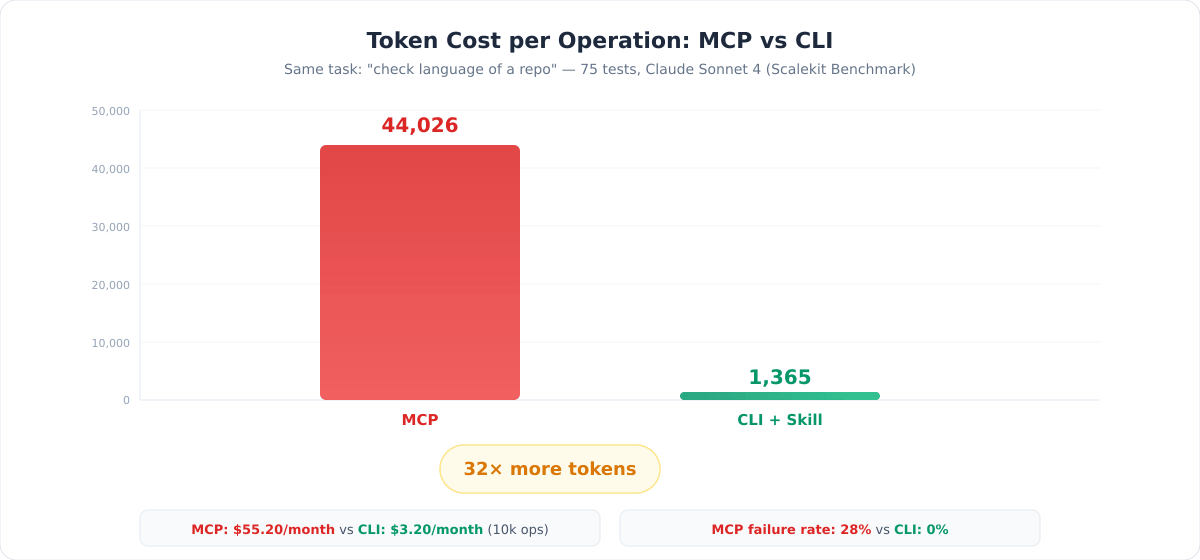
- Independent benchmarks by Scalekit showed MCP uses 4–32× more tokens than CLI for identical operations, across 75 tests with Claude Sonnet 4
- The same benchmark found a 28% failure rate on MCP calls due to TCP timeouts — something that simply doesn’t happen with local CLI tools
- At scale (10,000 operations/month), MCP costs roughly $55 vs. $3 for CLI — a 17× difference driven entirely by token overhead
These aren’t opinions. They’re measurements.
The MCP Trilemma
Once you understand the context cost, you face an uncomfortable set of choices:
Load everything upfront. You get full capability, but 72% of the agent’s memory is gone. It has less room to reason about your actual problem. The agent becomes less intelligent.
Limit your integrations. Use only one or two MCP servers to save context. But then you’ve lost the value proposition of a universal protocol — you might as well just use the CLI directly.
Build dynamic tool loading. Load MCP tools on demand based on what the user needs. Technically possible, but you’re now building a service to manage your services, adding latency and middleware complexity.
As Simon Willison put it: “Almost everything I might achieve with an MCP can be handled by a CLI tool instead.”
David Zhang, building the AI product Duet, went further — he removed all MCP integrations entirely, even after implementing OAuth and Dynamic Client Registration. The trade-off was simply untenable.
The Alternative: Skills + CLI
A Skill is a Markdown file. That’s it.
It contains structured instructions that teach an AI agent how to accomplish a specific domain task. Think of it as a runbook you’d give to a new team member: here are the procedures, the commands, the conventions, the edge cases.
The key difference from MCP is progressive disclosure:
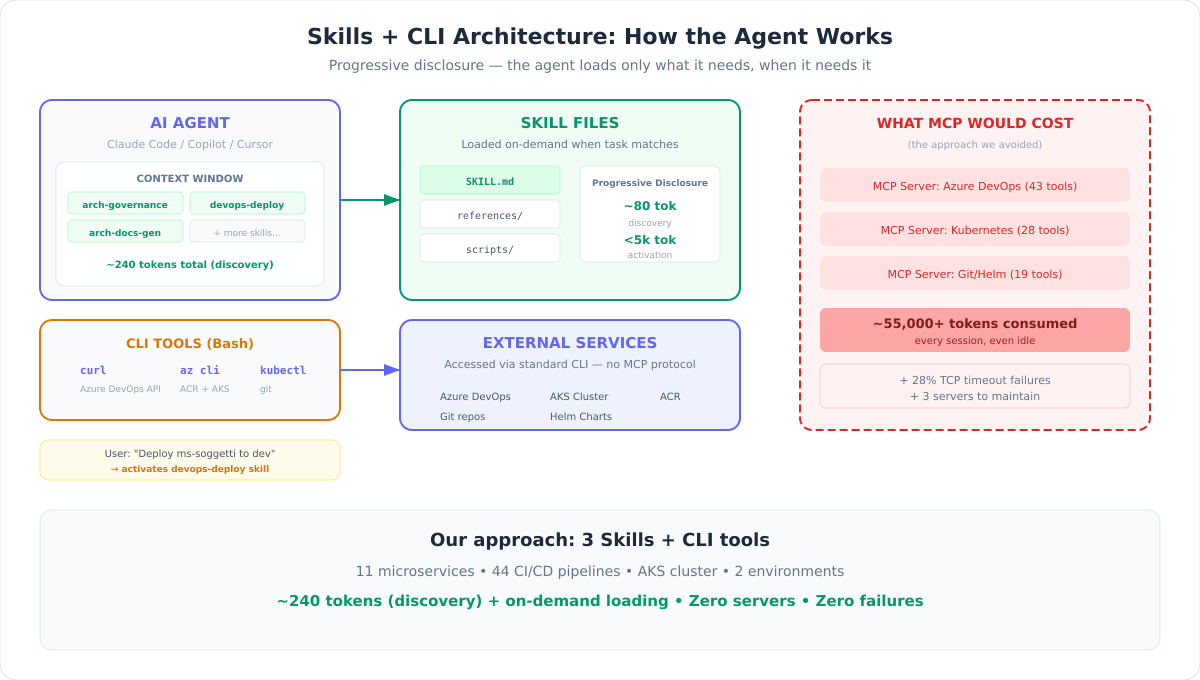
- Discovery (~80 tokens): The agent sees only the skill’s name and a one-line description. This is all that sits in the context window by default.
- Activation (<5,000 tokens): Only when the user’s task matches the skill, the full instructions are loaded. Irrelevant skills stay out of the context entirely.
- Execution (0 additional tokens): The agent uses tools it already has —
curl,git,kubectl,az cli— to carry out the instructions. No protocol layer, no server to maintain.
One hundred skills loaded cost less context than a single MCP server.
And because skills are plain text files versioned in Git, anyone on the team can read, edit, review, and improve them. No server deployments, no infrastructure, no debugging opaque protocol errors.
What We Built: Three Skills for a Complex Enterprise Platform
Our platform is a distributed system for an enterprise back-office domain — microservices, micro-frontends, event-driven architecture, Kubernetes deployments, the works. Here’s what we built instead of MCP servers.
Skill 1: Architecture Governance
The problem: With 11 microservices evolving independently, architectural documentation became obsolete the moment it was written. AI assistants (Claude, Copilot) generated code that didn’t follow our conventions. Technical debt accumulated invisibly.
What the skill does: It serves as the single source of truth for the platform’s target architecture. It knows our DDD patterns, messaging conventions, folder structures, naming rules, and eight absolute architectural constraints. When invoked, it generates and updates 12 structured documents — from guidelines and compliance audits to technical debt registers with effort estimates.
Why not an MCP? This is pure knowledge work. There’s no external API to call. The skill teaches the agent our conventions and procedures — something that belongs in a text file, not a protocol server. An MCP server for this would have loaded thousands of tokens of schema definitions for endpoints that are really just “read this file and apply these rules.”
The skill also generates CLAUDE.md and GitHub Copilot instruction files, so AI assistants across the entire team produce code that conforms to our architecture. Governance as code — with zero runtime overhead.
Skill 2: CI/CD & Deployment Orchestration
The problem: We manage 44 Azure DevOps pipelines (CI builds, NuGet publishing, CD deployments across two environments), an AKS cluster, a container registry, and Helm charts. Deploying a service requires checking build status, pulling image tags, updating chart versions, committing to the infrastructure repo, triggering CD pipelines, and verifying pods.
What the skill does: It teaches the agent the complete deployment workflow — every pipeline ID, every API endpoint, every Helm chart path, every kubectl command. The agent orchestrates multi-service deployments by calling curl (Azure DevOps API), az cli (container registry), kubectl (Kubernetes), and git (Helm chart updates).
Why not an MCP? Imagine loading 44 pipeline definitions as MCP tool schemas. That’s tens of thousands of tokens — consumed every session, even when you just want to check a build status. Instead, our skill teaches the agent to use curl with the right headers and URLs. Progressive disclosure: the agent reads the deployment section only when you ask for a deploy. The rest of the time, it costs ~80 tokens.
The benchmark comparison makes this stark: a CLI operation to check a repository’s language costs 1,365 tokens. The same operation via MCP costs 44,026 tokens (Scalekit, 75 tests, Claude Sonnet 4). For our 44-pipeline system, the savings compound dramatically.
Skill 3: Architecture Documentation Generator
The problem: Keeping architectural decisions, component registries, and service specifications in sync across a growing platform is a full-time job. Changes to one service ripple across documentation in unpredictable ways. Draft components need different treatment than production ones.
What the skill does: It maintains a central registry of all system components with lifecycle states (approved, draft, deprecated). It generates C4 model definitions, system interaction maps, and per-service technical specifications. Components in “draft” status are automatically excluded from compliance audits and debt analysis — no false negatives during design phases.
Why not an MCP? Same principle: this is structured knowledge, not API integration. The skill contains reference files for each architectural pattern, loaded on demand. A component registry doesn’t need a running server — it needs a well-organized text file and clear instructions on how to update it.
How We Built Them: The Skill Creator
Here’s where it gets interesting. We didn’t write these skills from scratch by hand and hope they worked. We used Anthropic’s Skill Creator — itself a skill — to build, test, and validate them.
This matters because it addresses the biggest objection to skills: “How do you know they actually work?”
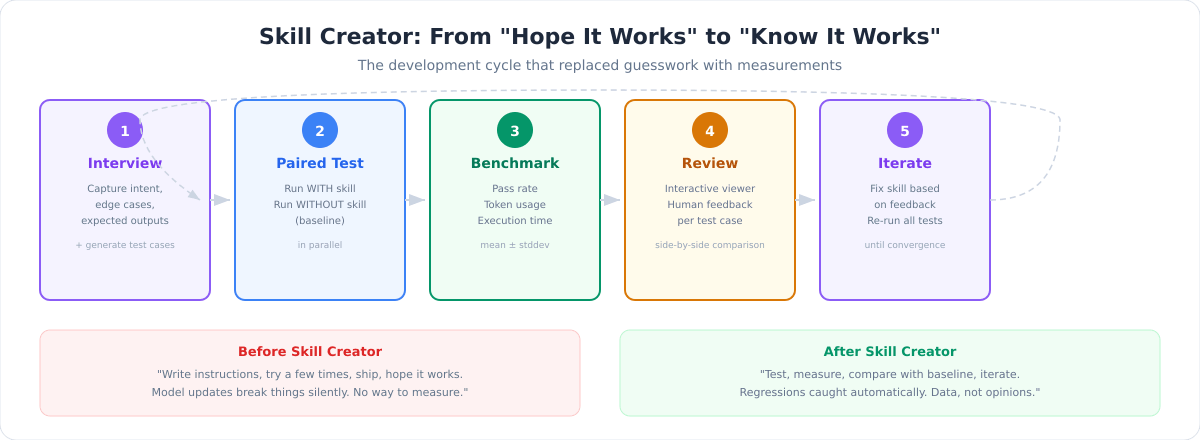
Before the Skill Creator existed, building a skill was an act of faith. You wrote instructions, tried them a few times, and shipped. If a model update broke something, you’d find out from users — not from tests. There was no systematic way to measure whether a skill improved the agent’s output or made it worse.
The Skill Creator changes this by bringing software engineering rigor to skill authoring:
Structured creation. It interviews you about the skill’s purpose, edge cases, expected inputs and outputs. It generates the SKILL.md and initial test cases — not just the skill, but the tests to validate it.
Paired testing. For every test case, it spawns two agents in parallel: one with the skill, one without (baseline). Both execute the same task. This is how you know the skill actually adds value — you’re comparing, not assuming.
Quantitative benchmarks. Every test produces metrics: assertion pass rates, token consumption, execution time, and the delta between with-skill and baseline. Mean and standard deviation across runs. If the delta is zero or negative, the skill isn’t helping — and you have the data to prove it.
Description optimization. The skill’s description is its trigger mechanism — it determines when the agent activates it. The Skill Creator generates 20 test queries (10 should-trigger, 10 should-not-trigger, with near-misses being the most valuable) and runs an optimization loop to reduce false positives and false negatives. Anthropic reported this process improved triggering accuracy on 5 out of 6 public document-creation skills.
Iterative refinement. Each improvement cycle creates a new directory with fresh test results, so you can compare iterations and track convergence. An interactive viewer lets you review outputs side-by-side and provide targeted feedback.
As Anthropic puts it: “Testing turns a skill that seems to work into one you know works.”
This is the fundamental shift. Skills are no longer tribal knowledge encoded as hopeful markdown. They’re tested artifacts with measured performance — closer to code than to documentation.
When MCP Still Makes Sense
This isn’t a “MCP is dead” article. MCP has legitimate use cases:
- B2B multi-tenant integrations where per-user OAuth is essential
- Real-time streaming via WebSocket where bidirectional communication matters
- Multi-agent systems with identity chains that need process isolation
- Ecosystems where an MCP registry already provides ready-made connectors for your exact needs
- Compliance environments that require strict process isolation between the agent and external services
The point isn’t to avoid MCP dogmatically. The point is to treat context as a scarce resource and choose the lightest tool that gets the job done.
For most internal workflows — DevOps, architecture governance, documentation, code review policies, deployment procedures — Skills + CLI are that lighter tool. They cost less context, require no infrastructure, fail more gracefully, and are readable by humans.
The Bottom Line
We run a platform with 11 microservices, 44 CI/CD pipelines, and an AKS cluster. Three Skills and standard CLI commands handle what would have required at least three or four MCP servers — each burning thousands of tokens per session.
The math is simple:
| Approach | Tokens per session | Infrastructure | Failure mode |
|---|---|---|---|
| 3 MCP servers | 55,000–143,000 | 3 servers to maintain | TCP timeouts (28%) |
| 3 Skills + CLI | ~240 (discovery) + on-demand | Zero — just text files | Transparent CLI errors |
The agent stays intelligent because its context window stays free. The team stays productive because anyone can read and improve a Markdown file. The system stays reliable because CLI tools don’t have TCP timeout failure modes.
And thanks to the Skill Creator, we don’t hope our skills work — we measure it.
If you’re building AI-assisted workflows and reaching for MCP by default, consider whether a well-written Skill and a CLI command might be all you need. The context window you save might be the intelligence your agent needs to actually solve your problem.
References:
- Apideck — “Your MCP Server Is Eating Your Context Window” (March 2026)
- Scalekit — MCP vs CLI Benchmark, 75 tests with Claude Sonnet 4
- Intuition Labs — “Claude Skills vs. MCP: A Technical Comparison” (Feb 2026)
- ravichaganti.com — “Agent Skills vs Model Context Protocol” (Feb 2026)
- Anthropic — “Improving Skill Creator: Test, Measure, and Refine Agent Skills” (2026)
- Anthropic — Skill Creator on GitHub